
What Is a Digital Business Card?
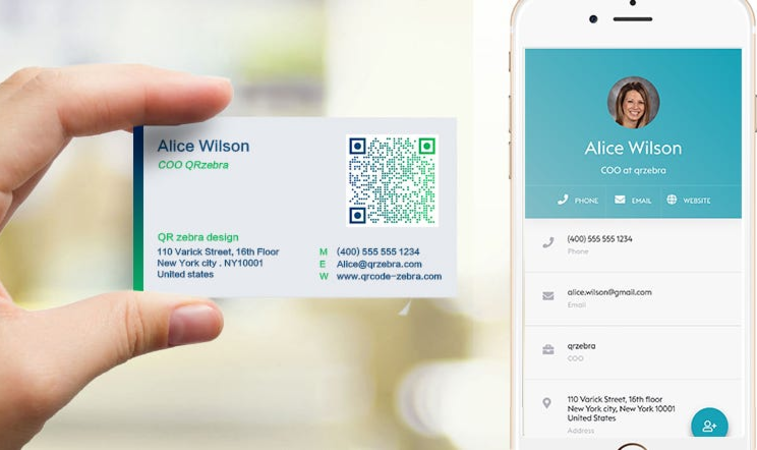
A digital business card is an online version of a traditional business card that allows you to share your professional contact information through a smartphone, computer, or other internet-connected device. Instead of handing someone a paper card, you can simply share a link or let them scan a QR code to open your digital card.
A digital business card can include much more information than a traditional printed card. Depending on the platform you use, you can add your name, job title, company information, phone number, email address, website, social media profiles, business location, services, photos, videos, and other useful information in one convenient place.
Your digital business card is usually available through a unique web address. This means that you can share it with anyone, anywhere, without having to print new cards or carry a stack of paper business cards with you.
How Does a Digital Business Card Work?
Creating a digital business card is usually simple. You create your profile, add your professional and contact information, customize the appearance of your card, and receive a unique link to your profile.
You can then share this link in many different ways. For example, you can send it by text message or email, add it to your social media profile, include it in your email signature, or share it with potential customers during a meeting.
Many digital business cards also use a QR code. A person can scan the QR code with a smartphone camera and immediately open your business card in their browser. There is no need to type a long web address or install a special application.
This makes digital business cards particularly useful at networking events, conferences, meetings, trade shows, and other situations where you need to exchange contact information quickly.
What Can You Put on a Digital Business Card?
One of the biggest advantages of a digital business card is the amount of information you can provide.
A professional digital business card may include:
- Your name and professional title
- Company or business name
- Phone number
- Email address
- Website
- Social media profiles
- Business address or location
- Working hours
- Products or services
- Photos and videos
- Customer testimonials
- Appointment or contact options
- A QR code
- Links to important online resources
Instead of trying to fit everything onto a small piece of paper, you can organize your information into a clear online profile.
For a freelancer, for example, a digital business card could include a portfolio and links to previous projects. A real estate professional could include property listings and contact information. A consultant could present their services, testimonials, and appointment options.
In this way, a digital business card can function as more than just an electronic contact card. It can become a simple online professional profile that helps people learn about you and your business.
Why Are Digital Business Cards Becoming Popular?
Traditional business cards are still useful, but they have several limitations. They can be lost, damaged, forgotten, or eventually thrown away. If your phone number, job title, website, or other information changes, you may also need to print a new batch of cards.
A digital business card is easier to update. You can change your information online while keeping the same digital card link or QR code.
Digital cards are also convenient for modern networking. Most people already carry a smartphone, so sharing a professional profile can take only a few seconds.
For businesses and professionals who communicate with customers online, a digital business card can also provide a natural connection between offline networking and their online presence.
Ultimately, the main purpose is simple: make it easier for people to find you, contact you, and learn more about what you do.
Digital Business Card vs. Traditional Business Card
For many years, traditional paper business cards have been one of the simplest ways to exchange professional contact information. They are still widely used, especially at meetings, conferences, networking events, and business appointments.
However, the way people communicate has changed. Smartphones, social media, websites, and online messaging have become an important part of everyday business communication. As a result, digital business cards offer an alternative way to share professional information.
So, what is the difference between a digital business card and a traditional business card?
Traditional Business Cards
A traditional business card is a printed piece of paper containing basic information about a person or company.
A typical business card may include:
- Name
- Job title
- Company name
- Phone number
- Email address
- Website
- Business address
- Company logo
The main advantage of a traditional business card is its simplicity. You can hand it to someone during a face-to-face conversation, and the person can keep it for future reference.
However, printed cards have limitations. The amount of information is limited by the physical size of the card. You also need to print new cards whenever important information changes.
For example, if you change your phone number, website, business address, or job title, the information printed on your existing cards cannot be updated.
Digital Business Cards
A digital business card provides your professional information through an online page.
Instead of giving someone a physical card, you can share a link or QR code that opens your digital profile.
A digital card can contain significantly more information than a traditional card. You can include contact details, social media links, photos, videos, services, customer reviews, business information, and other resources.
Another important advantage is that digital information can be updated. If your phone number or website changes, you can update your online card without having to print a completely new set of business cards.
Which One Should You Use?
Digital and traditional business cards do not necessarily have to compete with each other. Many professionals can use both.
A printed business card can be useful when meeting someone who expects a physical card. A digital business card can provide a more complete online profile that can be shared before, during, or after a meeting.
For example, you could give someone your traditional business card and also let them scan a QR code that opens your digital profile. This gives them both the physical contact information and the ability to explore your online profile.
For professionals who frequently communicate online, travel, attend networking events, or work with customers remotely, a digital business card can be particularly convenient.
The most important consideration is not whether one format completely replaces the other. It is how easily potential customers, partners, and contacts can access your information when they need it.
A digital business card gives you another simple way to make your professional information available online—and you can share it whenever and wherever you connect with someone.
How to Create a Digital Business Card in 5 Minutes
Creating a digital business card does not have to be complicated. With an online digital business card builder, you can create a professional profile in just a few minutes without any graphic design or coding skills.
The exact process may vary depending on the platform, but the basic steps are usually simple.
1. Choose a Digital Business Card Platform
Start by choosing an online platform that allows you to create and manage digital business cards.
Look for a service that provides the features you actually need, such as customizable profiles, social media links, QR codes, contact information, photos, videos, and analytics.
If you plan to use your digital business card for your business, it is also useful to choose a platform that allows you to update your card whenever necessary.
2. Create Your Account
The next step is to create an account on the platform.
After registration, you can usually access a dashboard where you can create and manage your digital business card.
Choose a professional username or profile address that is easy to remember and share.
3. Add Your Contact Information
Enter the basic information that you want people to see.
This can include:
- Your full name
- Job title
- Company name
- Phone number
- Email address
- Website
- Business location
- Business hours
Make sure that your contact information is accurate. A digital business card is useful only when people can easily use it to contact you.
4. Add Your Social Media Profiles
If you use social media for professional purposes, add your relevant profiles to your digital business card.
Depending on your profession, these might include LinkedIn, Facebook, Instagram, YouTube, TikTok, X, or other platforms.
Social media links can help potential customers or business contacts learn more about your work and stay connected with you.
5. Add Your Services, Products, or Portfolio
A digital business card can contain much more information than a traditional paper card.
Consider adding a short description of what you do and the products or services you provide.
For example, a photographer could add a portfolio of recent work. A consultant could list their services. A restaurant could provide a menu and opening hours. A real estate professional could include property listings and contact information.
The goal is to give visitors enough useful information to understand what you offer.
6. Customize the Appearance
Your digital business card should look professional and match your personal or business identity.
Depending on the platform, you may be able to customize elements such as:
- Profile image
- Logo
- Colors
- Background
- Fonts
- Layout
- Images
- Videos
Avoid adding too many unnecessary elements. A clean and easy-to-read design makes it easier for visitors to find the information they need.
7. Add a QR Code
A QR code can make your digital business card especially convenient to share.
When someone scans the code with their smartphone, they can be taken directly to your online business card.
You can use the QR code on printed materials, presentations, flyers, advertisements, packaging, or even on your physical business card.
This creates a simple connection between your offline and online presence.
8. Review Your Digital Card
Before sharing your card, open it on your smartphone and check how it looks.
Make sure that:
- Your contact information is correct
- All links work
- Your profile photo looks appropriate
- Your services are clearly described
- Your social media links open correctly
- Your QR code works
- The page is easy to navigate
It is worth spending an extra minute checking your card before giving the link to potential customers.
9. Share Your Digital Business Card
Once your card is ready, you can start sharing it.
You can send your digital business card through:
- Text messages
- WhatsApp or other messaging apps
- Social media
- Your website
- Email signatures
- QR codes
- Printed marketing materials
You only need one digital card link, but you can share it through many different channels.
Create Your Digital Business Card Today
A digital business card can be created in just a few minutes and updated whenever your professional information changes.
Whether you are a freelancer, entrepreneur, salesperson, consultant, real estate professional, or small business owner, having a professional online business card gives you a simple way to keep your contact information in one place.
With a digital business card builder, you can create your profile, customize its appearance, add your contact and business information, generate a QR code, and start sharing your card with your network.
The process is simple: create your card, add your information, customize it, and share your link.